Copilot vs ChatGPT vs Gemini 2026: Full Comparison
Quick answer: GitHub Copilot is the strongest pick for developers who want AI assistance built directly into their editor, ChatGPT remains the most versatile general-purpose assistant for writing and research, and Gemini leads on reasoning benchmarks and native multimodal tasks at a lower price than ChatGPT Plus. Notably, Copilot and ChatGPT both run on OpenAI’s GPT-5.5 in 2026, so the real difference between them is packaging and integration, not underlying intelligence — Gemini is the genuinely different model of the three.
Updated: July 2026 • ~12 minute read • Fact checked against official pricing and benchmark sources
Overview
Comparing Copilot, ChatGPT, and Gemini in 2026 isn’t a clean three-way split the way it might look at first glance. GitHub Copilot and ChatGPT are both built on OpenAI’s GPT-5.5, and as of June 2026 Copilot’s subscription actually gives you a choice of model families inside one plan — OpenAI, Anthropic, and Google models are all selectable in Copilot Chat, depending on your tier. Gemini, by contrast, is Google’s own model end to end. So the real decision usually isn’t “which model is smartest” — it’s “where do I want AI to live”: inside my code editor (Copilot), in a standalone chat window for general work (ChatGPT), or built into Google’s ecosystem with native multimodal reasoning (Gemini). For a closer look at how a fully open-weight model stacks up against these three, see our DeepSeek vs ChatGPT vs Gemini 2026 comparison, and for how Anthropic’s Claude fits in, see Claude vs ChatGPT 2026: Full Pricing & Feature Guide.
Key Takeaways
- GitHub Copilot and ChatGPT both run on GPT-5.5 — the meaningful difference is IDE integration versus a general-purpose chat interface, not raw model capability.
- Gemini 3.1 Pro edges out GPT-5.5 on graduate-level science reasoning (94.3% vs 93.6% on GPQA Diamond) and leads decisively on abstract reasoning (77.1% on ARC-AGI-2).
- GPT-5.5 leads real-world coding benchmarks (88.7% on SWE-Bench Verified), which is why it’s also the model powering Copilot’s agent and chat features.
- GitHub Copilot switched to usage-based “AI Credits” billing on June 1, 2026 — plan prices stayed the same, but heavy agent or chat usage can now draw down credits faster than the old flat-request system.
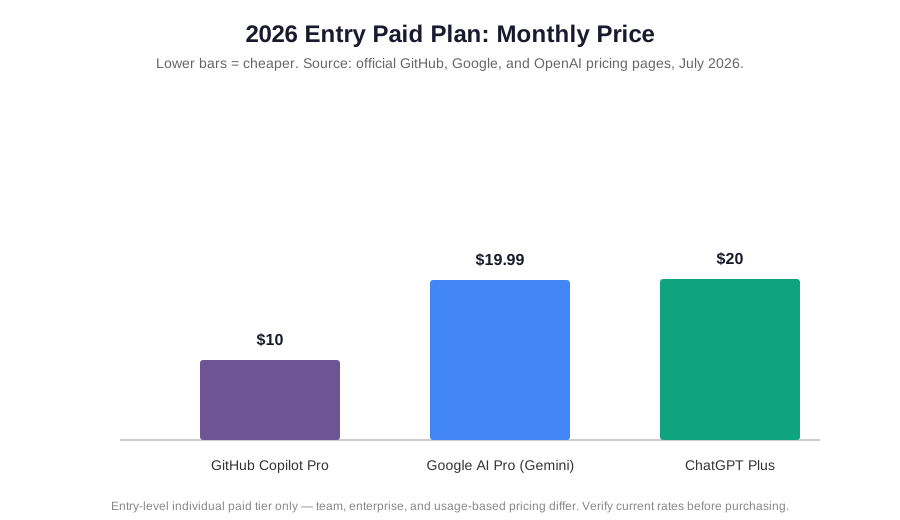
- On price, GitHub Copilot Pro ($10/month) undercuts both ChatGPT Plus ($20/month) and Google AI Pro ($19.99/month) at the individual tier.
Who This Guide Is For
This comparison is written for developers deciding whether to add an AI coding assistant, knowledge workers choosing a general-purpose assistant subscription, and teams weighing a company-wide AI tool. If you just want the one-line version: pick Copilot if your primary need is in-editor coding help, ChatGPT if you want the most versatile all-purpose assistant, and Gemini if reasoning quality and native multimodality matter more than ecosystem lock-in.
Why You Can Trust This Guide
The figures in this guide are drawn from each provider’s official pricing and documentation pages, GitHub’s own engineering blog posts about its 2026 billing changes, and independent benchmark trackers, cross-checked against at least one independent source where possible. We don’t run our own benchmark suite, and we say so plainly rather than implying lab-tested results we don’t have. Where a number “may vary” by region, plan, or promotional period, we’ve flagged it instead of stating it as fixed.
Quick Comparison Summary
- Best for in-editor coding: GitHub Copilot — native IDE integration, unlimited completions on every paid plan, and a choice of underlying models.
- Best all-purpose assistant: ChatGPT — the most versatile interface for writing, research, and general-purpose tasks outside a codebase.
- Best reasoning-per-dollar: Gemini 3.1 Pro — ahead on science and abstract-reasoning benchmarks at a slightly lower price than ChatGPT Plus.
Comparison Table
| Feature | GitHub Copilot | ChatGPT | Gemini |
|---|---|---|---|
| Underlying model | GPT-5.5 by default; Claude, Gemini, and xAI models selectable on paid plans | GPT-5.5 | Gemini 3.1 Pro (Google’s own model) |
| Individual entry paid plan | Copilot Pro, $10/month | ChatGPT Plus, $20/month | Google AI Pro, $19.99/month |
| Higher individual tier | Copilot Pro+, $39/month | ChatGPT Pro, $200/month | Google AI Ultra, from roughly $99.99/month |
| Team / org pricing | Business $19/user/month; Enterprise $39/user/month | Business and Enterprise tiers, custom pricing | Bundled into Google Workspace business tiers |
| Primary environment | IDE (VS Code, JetBrains, etc.), CLI, GitHub.com | Standalone chat app and API | Standalone app, Google Workspace, API |
| Signature strength | In-editor integration, unlimited code completions | General versatility, largest ecosystem | Reasoning benchmarks, native multimodality |
The short version: Copilot wins on developer workflow integration and is the cheapest entry-level paid plan. ChatGPT wins on general-purpose versatility and ecosystem size. Gemini wins on reasoning benchmarks and native multimodal handling, while undercutting ChatGPT Plus slightly on price.
Pricing Breakdown
GitHub Copilot’s pricing looks simple on the surface — Free, Pro at $10/month, Pro+ at $39/month, and Max at $100/month for individuals, with Business at $19/user/month and Enterprise at $39/user/month for organizations — but it changed shape on June 1, 2026, when GitHub moved every plan to usage-based “AI Credits” billing. Code completions and Next Edit Suggestions stay unlimited and free on every paid plan, but chat, agent mode, code review, and the Copilot CLI now draw from a monthly credit pool billed by token consumption. Base plan prices didn’t change, but how far those dollars stretch under heavy agent use did, so budget for potential overage if your team leans on agent workflows. If you’re evaluating AI tooling for a specific business function rather than coding, our AI business automation guide walks through that side of the budgeting question.
ChatGPT and Gemini price more conventionally by comparison. ChatGPT Plus is $20/month, with a cheaper Go tier around $8/month in supported regions and a $200/month Pro tier for the heaviest users. Google AI Plus starts near $7.99/month, Google AI Pro is $19.99/month, and Google AI Ultra sits at the top of the consumer lineup. At the individual entry-paid tier, Copilot Pro is meaningfully cheaper than either ChatGPT Plus or Google AI Pro — but that comparison is a bit apples-to-oranges, since Copilot Pro is scoped to coding while ChatGPT Plus and Google AI Pro are general-purpose assistants with broader feature sets.
Benchmark Performance
Because Copilot’s chat and agent features run on the same GPT-5.5 model as ChatGPT, benchmark comparisons here really come down to GPT-5.5 versus Gemini 3.1 Pro. On real-world coding, GPT-5.5 leads with an 88.7% score on SWE-Bench Verified, which is also why it remains Copilot’s default engine for agentic coding tasks. On graduate-level science reasoning, Gemini 3.1 Pro edges ahead at 94.3% on GPQA Diamond versus GPT-5.5’s 93.6% — a close race. Gemini’s clearest advantage shows up on abstract reasoning, where it scores 77.1% on ARC-AGI-2, more than double some earlier Gemini generations on the same test. Context window sizes are similar across the board, with both families now offering roughly a million tokens or more.
The practical read: these are close benchmark races, not blowouts, and Copilot’s ability to switch underlying models inside one subscription means the “which model is smarter” question matters less than it used to — you can often just pick the model per task rather than committing to one vendor’s intelligence for everything.
Real-World Scenarios
- A developer wants inline suggestions while writing code. Copilot’s native editor integration and unlimited completions on every paid plan make it the natural fit — neither ChatGPT nor Gemini offers the same in-IDE autocomplete experience out of the box.
- A marketing team needs to draft campaign copy and analyze customer data. ChatGPT’s broad versatility across writing and analysis tasks suits this well, and it pairs naturally with workflow tools like AI email marketing platforms.
- An analyst needs to process a long report with embedded charts and tables. Gemini’s native multimodality and large context window handle mixed text-and-visual documents with less friction — similar to the kind of workload covered in our best data visualization tools for finance roundup.
- A small business wants one AI subscription to cover several departments. This is where the “same model, different packaging” issue matters most — paying for both Copilot and ChatGPT can mean paying twice for GPT-5.5 access in two different wrappers, so map out actual use cases like AI for small business workflows before doubling up.
Pros & Cons
GitHub Copilot
Pros:
- Deep, native integration into VS Code, JetBrains IDEs, the CLI, and GitHub.com
- Unlimited code completions and Next Edit Suggestions on every paid plan, with no credit metering
- Choice of underlying model (GPT-5.5, Claude, Gemini, and xAI models) inside one subscription on paid tiers
- Cheapest individual entry-paid plan of the three at $10/month
Cons:
- Scoped primarily to coding and developer workflows — not a general-purpose assistant replacement
- June 2026 shift to usage-based AI Credits means heavy chat/agent users can hit limits faster than under the old flat-request system
- Higher tiers (Pro+ at $39/month, Max at $100/month) get expensive quickly for power users
ChatGPT
Pros:
- Most versatile general-purpose interface — writing, research, brainstorming, and analysis in one place
- Largest third-party plugin, custom-GPT, and integration ecosystem of the three
- Free tier available for casual use, with a clear upgrade path
Cons:
- No native in-editor coding integration — coding help lives in a separate chat window, not inline
- Runs the same GPT-5.5 model as Copilot, so paying for both can mean paying twice for the same underlying intelligence
- Plus tier ($20/month) costs more than Copilot Pro for users who only need coding help
Gemini
Pros:
- Leads on graduate-level science and abstract-reasoning benchmarks (GPQA Diamond, ARC-AGI-2)
- Strongest native multimodal handling of text, image, audio, and video among the three
- Slightly cheaper than ChatGPT Plus at the entry paid tier ($19.99 vs $20)
- Deep integration with Google Workspace for teams already in that ecosystem
Cons:
- No native in-editor coding integration comparable to Copilot
- Smaller third-party plugin ecosystem than ChatGPT
- Best value mainly for teams already committed to Google Workspace rather than a mixed toolset
Who Should Choose Which
- Choose Copilot if you: spend most of your day writing code and want AI suggestions inline, without switching to a separate chat window — a natural fit alongside tools like AI accounting tools or other developer-built internal software.
- Choose ChatGPT if you: need one flexible assistant for writing, research, and general problem-solving across a business — well suited to teams also exploring AI HR software or similar cross-functional automation.
- Choose Gemini if you: want the strongest reasoning-per-dollar and native multimodal handling, especially if your organization already runs on Google Workspace.
It’s increasingly common to run more than one: a developer might use Copilot in the editor and ChatGPT or Gemini in a browser tab for research and planning, since the two use cases rarely overlap directly.

Who Should Not Choose Each One
- Skip Copilot if: you need a general-purpose assistant for non-coding work — its feature set and pricing are built around developer workflows, and you’ll pay for capabilities you won’t use outside an IDE.
- Skip ChatGPT if: your primary need is inline coding assistance and you’re already paying for Copilot — running both means paying twice for access to largely the same underlying GPT-5.5 model.
- Skip Gemini if: your workflow is coding-heavy and editor-integration matters most, or your team has no existing ties to the Google ecosystem and would rather consolidate around one assistant elsewhere.
Common Mistakes to Avoid
- Assuming Copilot and ChatGPT give you fundamentally different intelligence. Both run on GPT-5.5 as of 2026 — the fix is to evaluate them on integration and workflow fit, not on “which one is smarter.”
- Ignoring the June 2026 Copilot billing change. Heavy chat and agent users can now draw down AI Credits faster than the old flat-request system allowed — the fix is to check your actual usage pattern against the credit allowances before assuming the sticker price is your real cost.
- Paying for multiple subscriptions that overlap. Running Copilot Pro+, ChatGPT Plus, and Google AI Pro simultaneously can mean redundant spend on similar capabilities — the fix is to map each tool to a distinct use case before adding a third subscription.
Overall Verdict
There’s no single winner across all three, because they’re not really competing head-to-head the way they might first appear. Copilot wins for in-editor coding integration and is the cheapest entry-level plan of the three. ChatGPT wins on general-purpose versatility and ecosystem breadth outside a codebase. Gemini wins on reasoning benchmarks and native multimodality, at a price close to ChatGPT Plus. If you only remember one thing: don’t compare these as three interchangeable chatbots — Copilot and ChatGPT share an underlying model but serve different workflows, and Gemini is the genuinely distinct option of the three, both in model and in ecosystem.
FAQs
Do Copilot and ChatGPT use the same AI model?
Largely, yes. As of 2026, GitHub Copilot’s default engine and ChatGPT both run on OpenAI’s GPT-5.5. Copilot’s paid plans also let you select other model families, including Claude and Gemini, inside Copilot Chat, so the model choice isn’t fixed to GPT-5.5 alone on higher tiers.
Which is cheaper: Copilot, ChatGPT, or Gemini?
At the individual entry-paid tier, GitHub Copilot Pro is the cheapest at $10/month, compared with Google AI Pro at $19.99/month and ChatGPT Plus at $20/month. That comparison isn’t perfectly apples-to-apples, though, since Copilot Pro is scoped to coding while the other two are general-purpose assistants.
Is Gemini better than ChatGPT for reasoning tasks?
On published benchmarks, Gemini 3.1 Pro edges ahead of GPT-5.5 on graduate-level science reasoning and leads more clearly on abstract reasoning tests. The gaps on some benchmarks are narrow, so for many everyday tasks the practical difference may be small — testing both on your own use case is the most reliable way to decide.
Can I use Copilot for tasks outside of coding?
Copilot Chat can handle general questions, but its feature set, pricing, and integrations are built around developer workflows inside GitHub and supported IDEs. For broad non-coding use — writing, research, general business tasks — ChatGPT or Gemini are typically a better fit.
What changed with GitHub Copilot pricing in 2026?
On June 1, 2026, GitHub moved all Copilot plans to usage-based “AI Credits” billing. Base plan prices stayed the same, but chat, agent mode, code review, and CLI usage now draw from a monthly credit pool billed by token consumption, while code completions remain unlimited and free on paid plans.
Review Methodology
This guide compares publicly published pricing, plan documentation, and third-party benchmark results current as of July 2026. We did not run our own benchmark suite or hands-on testing, and figures above are presented as reported by vendors and trackers, cross-checked against at least one independent source where possible. AI provider pricing, plan structures, and benchmark scores change frequently — verify current numbers on each provider’s official site before making a purchasing decision.
Last Reviewed: July 2026 | Last Updated: July 2026 | Next Scheduled Review: January 2027