Grok vs ChatGPT vs Gemini: Which AI Assistant Should You Use in 2026?
Quick answer: ChatGPT Plus ($20/mo) is the best all-around pick for writing, coding, and general assistant work. Gemini (Google AI Pro, $19.99/mo) wins if you live in Gmail, Docs, and Drive, or need a huge context window. Grok (SuperGrok, $30/mo) is the one to choose for real-time X/web search and a faster-moving, more opinionated assistant.
Grok, ChatGPT, and Gemini, compared honestly
All three of these assistants can write an email, summarize a document, or explain a concept competently — that part of the decision is basically solved. Where they actually diverge in 2026 is pricing structure, how each one handles real-time information, and how deeply each one plugs into the tools you already use every day. This guide walks through all three, using each provider’s own published pricing and product pages as of July 2026, plus independent testing and reporting where the providers themselves don’t say enough.
If you’ve used any AI chat assistants before, you already understand the basics: type a prompt, get a response, iterate. What’s worth your time here is the practical stuff — what each plan actually costs once you account for the tier you’d really need, how each one behaves when your task needs current information versus deep reasoning, and where each one quietly falls short.
Who this guide is for
This comparison is for anyone choosing a primary AI chat assistant for personal or professional use — students, writers, developers, small-business owners, and knowledge workers deciding whether to pay for one of these tools (or more than one). It assumes you want a working understanding of the trade-offs rather than a marketing pitch, and it’s less useful if you’re evaluating these tools purely for enterprise procurement, where custom Business and Enterprise pricing and admin controls matter more than the consumer tiers covered here.
Why you can trust this guide
Every price and feature claim in this article was checked against each company’s own pricing and help-center pages, then cross-referenced against independent reporting from at least one additional source, because vendor pricing pages change without much notice and tier names don’t always map cleanly to the model you actually get. Where a number could not be independently confirmed, we’ve said so rather than presenting an estimate as fact.
Fact check
All pricing figures below were verified in July 2026 directly against OpenAI’s help center and business pricing pages, Google’s official I/O 2026 announcement, and independent pricing trackers for xAI’s Grok, since xAI does not publish a single consolidated pricing page in the way OpenAI and Google do. Model names and version numbers move quickly in this category — Grok in particular has retired several model IDs in 2026 — so treat any specific model name here as accurate for July 2026 and confirm current details before you subscribe.
Disclosure
This article contains outbound links to third-party pricing and news sources for verification purposes. It does not contain affiliate links, and this site has no financial relationship with OpenAI, xAI, or Google that influenced this comparison.
How we selected and scored these tools
We compared Grok, ChatGPT, and Gemini because they’re the three assistants most people are actually choosing between in 2026 — each backed by a major lab, each with a real consumer subscription business, and each updated frequently enough that a comparison from even six months ago is already stale. We weighted four factors: price relative to what a typical plan actually unlocks, day-to-day performance on writing and reasoning tasks, ease of use for a non-technical person, and how well each one integrates into other software people already use. No factor was tested with a formal benchmark suite of our own; where we cite a benchmark score, it’s the provider’s own published figure or an independent report, clearly attributed as such.
What’s new since our last update
- OpenAI shipped GPT-5.6 (the Sol/Terra/Luna model family) on July 9, 2026, and added a $100/month Pro tier in April to sit between Plus and the existing $200 Pro plan.
- Google restructured its consumer AI plans at I/O 2026, cutting the entry price of its top tier — now called Google AI Ultra — from $249.99 to $99.99 per month, and made Gemini 3.5 Flash the default model across the Gemini app in July.
- xAI launched Grok 4.5 on July 8, 2026, and is rolling it out to SuperGrok subscribers in stages rather than all at once, which means two people on the same plan may briefly have access to different model versions.
Comparison table
Here’s the short version. All prices are the published monthly rate as of July 2026 in USD; annual billing is sometimes cheaper and is noted where it applies.
| Feature | ChatGPT | Grok | Gemini |
|---|---|---|---|
| Free tier | Yes — limited GPT-5.6-family access, ads on some regions | Yes — roughly 10 prompts/2 hours on a lighter model | Yes — Gemini 3.5 Flash with capped access to 3.1 Pro |
| Entry paid plan | Go — $8/month (higher limits, not the flagship model) | X Premium — $8/month (bundled with X platform perks) | AI Plus — $4.99/month |
| Mainstream paid plan | Plus — $20/month (full model access, no ads) | SuperGrok — $30/month or $300/year | AI Pro — $19.99/month |
| Top consumer tier | Pro — $100 or $200/month (usage headroom, same model access) | SuperGrok Heavy — $300/month | AI Ultra — $99.99 or $199.99/month |
| Team pricing | Business — roughly $20–25/seat/month | Custom enterprise pricing, typically from ~$100/seat | Bundled into Google Workspace from $14/user/month |
| Standout strength | Balanced writing, coding, and agentic task performance | Real-time X/web data and a distinct conversational style | Native Google Workspace integration and large context window |
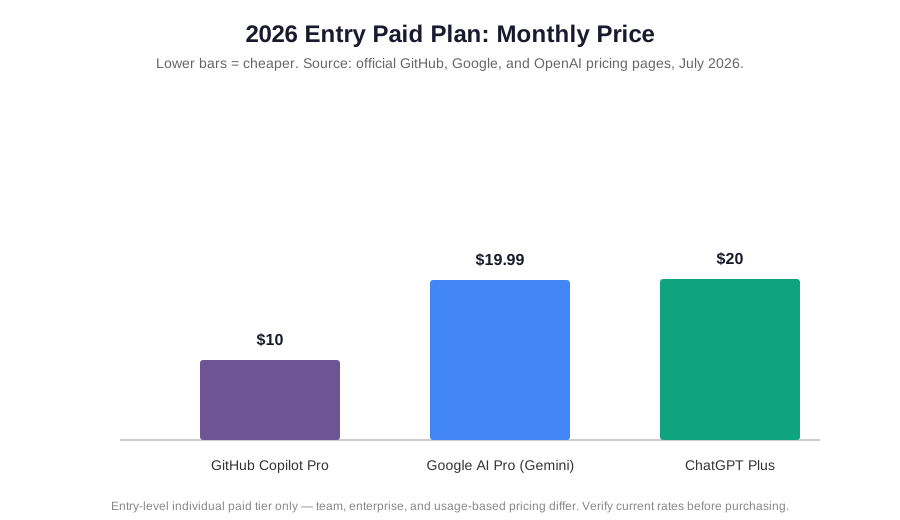
The takeaway from the table: at the mainstream paid tier, Gemini is the cheapest of the three by a small margin and includes meaningful cloud storage, ChatGPT Plus is the most predictable in what you get for the price, and Grok is the most expensive standalone option unless you’re already paying for X Premium anyway.
Quick comparison summary
- Best overall for most people: ChatGPT (Plus)
- Best value at entry price: Gemini (Google AI Pro)
- Best for real-time information: Grok (SuperGrok)
- Best for Google Workspace users: Gemini
- Best for a coding-heavy workflow: ChatGPT (Plus or Pro, with Codex)
Feature-by-feature comparison
Price
Pricing is where the comparison has gotten genuinely more complicated over the past year. ChatGPT now runs a six-tier ladder: Free, Go ($8/month), Plus ($20/month), two Pro tiers ($100 and $200/month, both unlocking the same GPT-5.6 model family with different usage caps), Business (roughly $20–25 per seat), and custom Enterprise pricing. The $20 Plus plan has held its price for three years while the underlying models improved substantially, which is part of why it’s still the plan most people should land on.
Grok is priced across two overlapping systems: standalone xAI plans and X-platform bundles. SuperGrok at $30/month (or $300/year) is the cleanest way to get full Grok access without paying for X itself; X Premium+ at $40/month gets you the same model access plus X platform perks like ad-free browsing. SuperGrok Heavy at $300/month is currently the only consumer tier with guaranteed full access to Grok 4.5, since the model is rolling out to the cheaper SuperGrok tier in stages. That’s a meaningfully higher price ceiling than either ChatGPT or Gemini charges for a comparable individual plan.
Gemini restructured its top tier at Google I/O 2026, cutting Google AI Ultra from $249.99 to $99.99/month for the base version, with a $199.99/month tier for 20x the usage limits. The mainstream Google AI Pro plan sits at $19.99/month — the same price bracket as ChatGPT Plus — but bundles 5TB of Google One cloud storage, which meaningfully changes the value math if you’d be paying for cloud storage separately anyway. To read more about how a fourth major assistant compares on price, see our Claude vs ChatGPT pricing breakdown.
Performance
ChatGPT’s current flagship, the GPT-5.6 family released July 9, 2026, leads on general reasoning and coding-agent benchmarks reported by independent evaluators, and it’s the model most people mean when they say ChatGPT “feels smart” for multi-step tasks like debugging code or restructuring a long document. It’s a strong pick for a marketing team drafting campaign copy or a student working through a research outline, since it holds context well across a long back-and-forth conversation.
Grok’s performance story is less about raw benchmark scores and more about what it can see. Because it’s built on top of X’s data feed, Grok 4.5 (launched July 8, 2026) is genuinely better than the other two at answering questions about something that happened in the last few hours — a breaking news story, a live sports result, a trending topic. Its DeepSearch and Big Brain modes add real capability for multi-step research, but they come with a steeper learning curve than the other two tools’ more streamlined interfaces.
Gemini’s Gemini 3.1 Pro model reports a notably strong score on the ARC-AGI-2 reasoning benchmark, and the assistant’s biggest performance edge is native multimodality — it can process images, video, audio, and very large documents in a single prompt without the workarounds that text-first assistants sometimes need. Google made the faster, cheaper Gemini 3.5 Flash the default model across the app in July 2026, which trades a bit of raw reasoning depth for noticeably quicker responses on everyday tasks.
Ease of use
ChatGPT remains the most approachable of the three for a first-time user — the interface is simple, the free tier is genuinely usable, and features like Custom GPTs and Projects are easy to find without training. This makes it a natural fit for educators building quizzes or a small business owner drafting customer emails without a technical background.
Grok asks more of a new user. Its plan structure is arguably the most confusing of the three right now, split across standalone subscriptions and X-bundle tiers with different model access at each, and features like Big Brain mode assume you already know when you need extended reasoning versus a quick answer. It rewards someone who wants a faster-moving, more personality-driven assistant and is willing to tolerate some rough edges.
Gemini sits in between. If you already use Gmail, Docs, or Android, Gemini feels almost invisible to onboard because it shows up inside apps you already know. Outside that ecosystem, the compute-based usage limits (rather than a fixed message count) can feel less predictable than ChatGPT’s published caps, even though in practice they rarely cut off a normal conversation.
Integration capabilities
ChatGPT supports Custom GPTs, an Agent mode that can operate a browser on your behalf, Codex for coding workflows, and — on Business plans — more than 60 third-party app integrations for teams that need it wired into existing tools like a CRM or ticketing system.
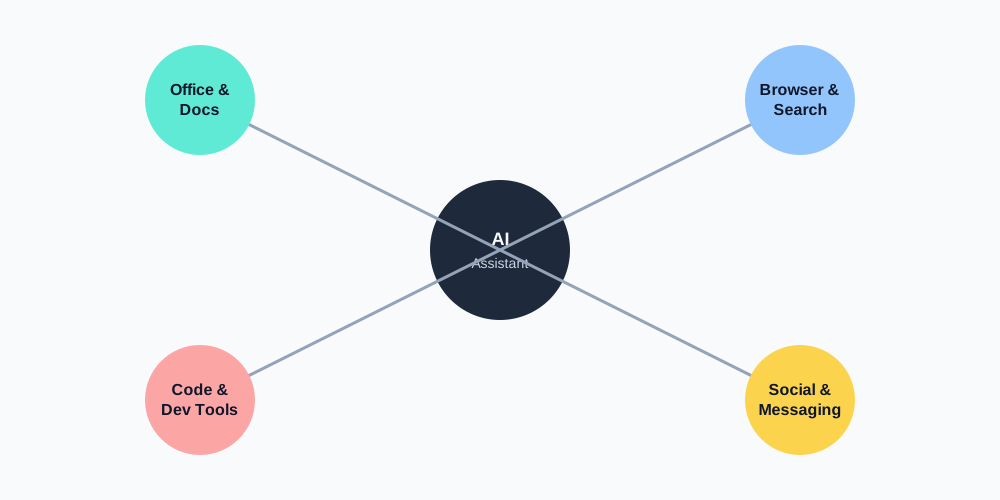
Grok’s integration story is centered on the X platform itself, plus a set of xAI API tools — web search, X search, code execution, and document search — billed per call rather than bundled into the subscription price. A data scientist pulling live social sentiment into a report is exactly the kind of workflow this setup is built for; a team wanting a single flat-rate integration bill will find the per-call billing less predictable.
Gemini has the deepest first-party integration of the three, showing up natively inside Gmail, Docs, Sheets, Drive, and Chrome, with Project Mariner adding limited agentic browser control on paid tiers. For a project manager who already lives in Google Workspace, that native presence removes a step that ChatGPT and Grok both still require — switching to a separate app or tab. For a look at how a fourth option handles this same trade-off, see our Copilot vs ChatGPT vs Gemini comparison.
Real-world scenarios

Scenario 1 — Freelance writer on a tight budget. Someone drafting blog posts and client emails a few hours a week likely doesn’t need more than ChatGPT’s free tier or the $8 Go plan; the flagship model only becomes worth paying $20/month for once volume or complexity picks up.
Scenario 2 — Social media manager tracking live conversation. A team monitoring breaking trends and needing an assistant that can reason about what’s happening on X right now is one of the few cases where Grok’s SuperGrok tier earns its higher price over the other two.
Scenario 3 — Small business already on Google Workspace. If the team is already paying for Workspace Business Standard, Gemini access is likely already included at $14/user/month, which can make a separate AI subscription redundant rather than additive.
Pros and cons
ChatGPT
- Pros: Most balanced performance across writing, reasoning, and coding; Plus pricing has stayed flat at $20/month for three years; the most beginner-friendly interface of the three; large third-party plugin and integration ecosystem.
- Cons: The six-tier plan structure is genuinely confusing, and the cheapest paid plan (Go) doesn’t include the flagship model; Deep Research is capped at 10 queries/month on Plus, which is tight for research-heavy work.
Grok
- Pros: Best-in-class access to real-time X and web data; a more distinct, less corporate conversational personality; generous free API credits for developers.
- Cons: The most expensive standalone consumer plan of the three; the newest flagship model is rolling out in stages, so access is inconsistent between subscribers on the same tier; steeper learning curve for its advanced reasoning modes.
Gemini
- Pros: Cheapest mainstream paid tier of the three at $19.99/month; deepest native integration with Gmail, Docs, and Drive; strong native multimodal handling of images, audio, and video; bundled cloud storage adds real value.
- Cons: Usage limits are compute-based rather than a fixed message count, which is harder to reason about in advance; the plan-name-to-model mapping has changed more than once in the past year, which makes older articles about “Gemini Advanced” pricing unreliable.
Who should choose which
- Choose ChatGPT if: you want one assistant that handles writing, coding, and general research well without much setup, and you’re not deeply tied to Google’s or X’s ecosystem.
- Choose Grok if: a meaningful part of your work depends on knowing what’s happening on X or the open web right now, and you’re comfortable with a less polished, faster-moving product.
- Choose Gemini if: you already work inside Gmail, Docs, Sheets, or Drive daily, or you regularly need to hand an assistant a very large document, image set, or video and want it processed in one prompt.
Who should skip each one
- Skip ChatGPT if: your work is centered on live social or web monitoring — Grok will simply give you fresher information — or if you’re already paying for Workspace and don’t need a second subscription doing overlapping work.
- Skip Grok if: you want predictable pricing and a stable, fully-rolled-out flagship model; the staged rollout of Grok 4.5 and the $30–$300/month spread make this a harder plan to budget around than the other two.
- Skip Gemini if: you’re not in the Google ecosystem at all and mainly want the strongest possible coding or agentic-task performance — independent reporting currently puts ChatGPT slightly ahead there.
Common mistakes to avoid
- Buying the cheapest paid tier and assuming you get the flagship model. On both ChatGPT (Go) and Grok (X Premium), the entry paid plan does not unlock the top model. Fix: check which specific model name a tier includes before subscribing, not just the price.
- Ignoring bundled value. Gemini’s $19.99/month plan includes 5TB of storage; if you’d pay for that storage separately, the effective AI cost is much lower than the sticker price suggests. Fix: subtract what you’d already spend on the bundled extras before comparing raw prices.
- Assuming “SuperGrok” always means the newest model. Because Grok 4.5 is rolling out in stages, two SuperGrok subscribers can have different model access at the same moment. Fix: check your account’s model picker directly rather than assuming the plan name guarantees the latest release.
Alternatives we considered
We didn’t include Anthropic’s Claude, DeepSeek, or Microsoft Copilot in the head-to-head table above simply because this guide is scoped to Grok, ChatGPT, and Gemini specifically — not because we tested them and found them lacking. If you’re weighing a broader field, our separate DeepSeek vs ChatGPT vs Gemini comparison and Copilot vs ChatGPT vs Gemini comparison cover those match-ups in more depth.
Verdict
If you only remember one thing: there isn’t a single winner here, because these three assistants are increasingly built for different jobs rather than competing head-on for the same one. ChatGPT is the safest general-purpose default, Gemini is the best-value pick if you’re already inside Google’s ecosystem, and Grok is the specialist choice for anyone whose work depends on knowing what’s happening right now. For most individual users starting from zero, ChatGPT Plus at $20/month remains the least risky place to start.
FAQs
Which AI assistant is cheapest for a solo user?
Gemini’s Google AI Plus plan at $4.99/month is the cheapest paid tier among the three, followed by ChatGPT Go and Grok’s X Premium, both at $8/month. If you want the flagship model rather than an entry tier, Gemini’s Google AI Pro at $19.99/month is also slightly cheaper than ChatGPT Plus’s $20/month.
Does Grok’s free tier include real-time X search?
Yes — xAI includes basic real-time web and X search on Grok’s free tier, though with tighter usage limits (roughly 10 prompts every two hours) and access to a lighter model than paid subscribers get.
Is ChatGPT Plus still worth it in 2026?
For most people who use an AI assistant regularly, yes. The $20/month price hasn’t changed in three years, and it now includes the full GPT-5.6 model family, Agent mode, Codex, and ad-free use — a meaningfully larger feature set than the same price bought a year ago.
Can I use more than one of these at once?
Plenty of people do — for example, ChatGPT for general writing and coding, plus Grok for live news or social monitoring. There’s no technical barrier to running multiple subscriptions; the only real cost is paying for more than one at a time.
Which one is best for Google Workspace users?
Gemini, without much competition. Because it’s built into Gmail, Docs, Sheets, and Drive directly, it removes the extra step of copying content into a separate chat window that both ChatGPT and Grok still require, and Workspace Business plans often already include it.
Review methodology
Pricing and feature claims in this guide were checked against each vendor’s own help-center and pricing pages, then compared against independent reporting to catch discrepancies or recent changes. We did not run a formal, repeatable benchmark suite of our own; performance claims are attributed to the provider or the independent source that reported them.
Last Reviewed: July 2026 | Last Updated: July 2026 | Next Scheduled Review: October 2026