Gemini for Coding: Harnessing AI’s Power in Development
Gemini for coding represents a significant advancement in software development, offering tools that enhance productivity and streamline coding processes. In a world where coding efficiency is paramount, understanding how Gemini can be integrated into workflows is crucial for developers and teams. This guide explores the functionalities, applications, and best practices of using Gemini in coding, providing actionable insights for both novice and experienced developers.
What is Gemini for Coding?
Gemini for coding is an artificial intelligence tool designed to assist developers in writing, debugging, and optimizing code. Leveraging advanced machine learning algorithms, Gemini understands coding languages and frameworks, making it a valuable asset for software engineers. By providing suggestions and automating repetitive tasks, Gemini not only speeds up the coding process but also reduces the likelihood of errors.
The tool functions by analyzing existing codebases and learning from them, which allows it to offer context-aware suggestions. This capability is particularly beneficial in environments where rapid development is necessary, as it allows developers to focus on solving complex problems rather than getting bogged down by routine tasks.
How Does Gemini for Coding Work?
Gemini operates through a combination of natural language processing (NLP) and machine learning techniques. At its core, it breaks down programming languages into understandable components, enabling it to provide relevant suggestions based on the context of the code being written. For instance, if you’re working in Python and start typing a function, Gemini can predict the next lines of code based on patterns it has learned from large datasets of existing code.
Additionally, Gemini can integrate into various Integrated Development Environments (IDEs), allowing for a smooth user experience. It can analyze code in real-time, highlighting errors and providing fixes instantly. This integration is key for maintaining workflow, as developers don’t need to switch between tools to benefit from Gemini’s features.
Why is Gemini Important for Developers?
In today’s fast-paced tech industry, the demand for rapid software development continues to rise. Gemini for coding addresses this need by enhancing the efficiency of the coding process. By automating mundane tasks and providing intelligent suggestions, developers can significantly reduce development time and improve code quality.
Moreover, with the increasing complexity of software projects, having a tool that can assist in understanding and managing code is invaluable. Gemini helps bridge the knowledge gap for less experienced developers, offering insights and guidance that would otherwise require extensive experience to obtain. This democratization of coding knowledge is a critical advantage in a field that often feels exclusive to seasoned professionals.
Benefits of Using Gemini for Coding
- Increased Productivity: By automating repetitive tasks, developers can focus on more critical aspects of their projects.
- Error Reduction: Real-time suggestions help catch errors early in the development process, leading to cleaner code and fewer bugs.
- Learning Aid: For beginners, Gemini serves as a learning tool, providing context and explanations that enhance understanding.
- Collaboration Enhancement: Teams can benefit from consistent coding practices, as Gemini encourages adherence to best practices.
Limitations of Gemini for Coding
While Gemini for coding offers numerous advantages, it also has its limitations. One significant concern is the potential for over-reliance on AI suggestions. Developers might become accustomed to accepting suggestions without fully understanding the underlying logic, which can hinder their growth and learning.
Additionally, Gemini may not always provide perfect suggestions. The quality of its recommendations can vary based on the complexity of the code and the specificity of the task at hand. Therefore, while Gemini is a powerful tool, it should be used as an aid rather than a replacement for critical thinking and problem-solving skills.

Who Should Use Gemini for Coding?
Gemini for coding is ideal for a wide range of users, from beginners to experienced developers. For novices, it can act as a tutor, helping them learn coding languages and best practices through real-time feedback. Intermediate developers can benefit from increased productivity and error reduction, while seasoned professionals might appreciate the tool’s ability to streamline complex projects.
However, teams that thrive on collaboration and code reviews should also consider integrating Gemini into their workflows. By using the tool collectively, teams can enhance their coding standards and ensure that everyone adheres to the same practices, ultimately leading to higher quality software. Exploring Gemini Image Generation: Revolutionizing Visual Content
Best Practices for Using Gemini in Coding
To maximize the benefits of Gemini for coding, developers should adopt specific best practices. First, it’s essential to engage with the suggestions actively rather than passively accepting them. Understanding why a particular solution is suggested fosters deeper learning and improves coding skills.
Second, developers should maintain a balance between using Gemini and relying on their coding skills. It’s crucial to develop problem-solving capabilities and not become overly dependent on AI tools. Regular practice and engagement with coding challenges will enhance proficiency over time.
Integrating Gemini into Your Development Workflow
Integrating Gemini into existing development workflows can be straightforward. Start by installing the appropriate plugin for your IDE and configuring it to suit your coding style. Once set up, begin working on small projects to familiarize yourself with its capabilities.
As you become more comfortable, gradually incorporate Gemini into larger projects. Analyze how its suggestions align with your coding practices and make adjustments as necessary. Continuous feedback loops can help refine how effectively Gemini fits into your workflow.
Common Mistakes to Avoid with Gemini
When using Gemini for coding, it’s important to avoid common pitfalls. One frequent mistake is neglecting to validate suggestions. Always test and verify that the proposed solutions are suitable for your context, as blindly accepting them can lead to significant issues down the line.
Another mistake is not utilizing Gemini’s full potential. Many users tend to use it only for code completion, overlooking its debugging and optimization features. Fully exploring all the functionalities offered by Gemini can lead to a more efficient coding experience.

Alternatives to Gemini for Coding
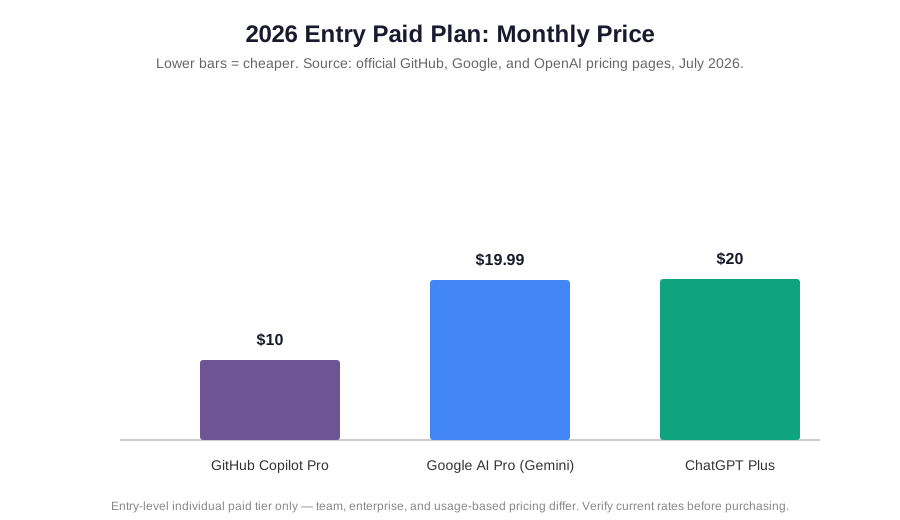
While Gemini is a powerful tool, it’s beneficial to explore alternatives that may better suit specific needs. Tools like GitHub Copilot, Kite, and TabNine also leverage AI to assist with coding, offering various features and integrations. Each alternative comes with its strengths and weaknesses, so evaluating them against your requirements is crucial.
For instance, GitHub Copilot is known for its seamless integration with GitHub repositories, which can significantly enhance collaboration in projects hosted on that platform. On the other hand, Kite offers a unique focus on Python coding, providing specialized support for data science applications and enhancing productivity in that area. Understanding the specific needs of your projects will help in selecting the right tool for enhancing coding efficiency.
Case Studies: Real-World Applications of Gemini for Coding
To understand the true impact of Gemini in coding, let’s look at a couple of real-world examples.
Case Study 1: Enhancing Team Collaboration at Tech Solutions Inc.
At Tech Solutions Inc., a medium-sized software development firm, the team was struggling with inconsistent coding practices and lengthy code reviews. After integrating Gemini into their IDEs, they noticed a remarkable change. Not only did the AI tool suggest best practices, but it also helped standardize their coding styles. AI Grammar Checker Alternative: Top Picks to Enhance Writing
As a result, code reviews became more efficient, taking half the time compared to before. Developers reported feeling more confident in their coding, as they received real-time feedback and suggestions that aligned with industry standards. This led to a 30% decrease in bugs found during the testing phase, proving that Gemini was instrumental in enhancing both productivity and code quality.
Case Study 2: Accelerating Development in a Startup Environment
A startup named InnovateNow was working on a tight deadline to launch their first product. With a small team of developers, they were under immense pressure to deliver a high-quality application. By implementing Gemini for coding, they were able to rapidly prototype features and iterate on their codebase.
Gemini’s ability to suggest code snippets and identify potential errors on-the-fly helped the team focus their efforts on feature development rather than troubleshooting. They managed to launch their product two weeks ahead of schedule, which not only impressed their investors but also gave them a competitive edge in a crowded market.
Frequently Asked Questions (FAQs)

1. What programming languages does Gemini support?
Gemini for coding supports a wide range of programming languages, including Python, JavaScript, Java, C++, and more. Its capabilities are continually expanding as it learns from new datasets.
2. Can Gemini replace traditional coding practices?
No, Gemini is designed to assist and enhance coding practices, not replace them. Developers should still engage in critical thinking and problem-solving.
3. How can I ensure I’m using Gemini effectively?
To use Gemini effectively, actively engage with its suggestions, validate them, and maintain a balance between relying on the tool and developing your coding skills.
4. Is there a cost associated with using Gemini for coding?
Pricing for Gemini can vary based on the version and features selected. It’s best to check the official website for the most accurate and up-to-date information.
5. What should I do if I encounter issues with Gemini?
If you encounter issues, consult the troubleshooting guide associated with your IDE or visit the official support forums for assistance.
Key Takeaways
- Gemini for coding is a powerful AI tool that enhances coding efficiency.
- It provides real-time suggestions and helps reduce errors in code.
- Active engagement with suggestions is crucial for maximizing benefits.
- Understanding limitations is essential to avoid pitfalls in reliance on AI.
Conclusion
Gemini for coding represents a transformative approach to software development. By integrating this AI tool into coding workflows, developers can significantly boost their productivity and code quality. However, like any tool, it’s essential to use it wisely, balancing its suggestions with personal coding skills and critical thinking. As the world of software development continues to evolve, embracing technologies like Gemini will be key to staying ahead in the competitive field of coding. For more insights into AI tools that enhance productivity, check out AI Productivity Tools and explore how AI can reshape your workflow.